
PX5 Series Brochure — English
PX5 · Product overview and technical specifications
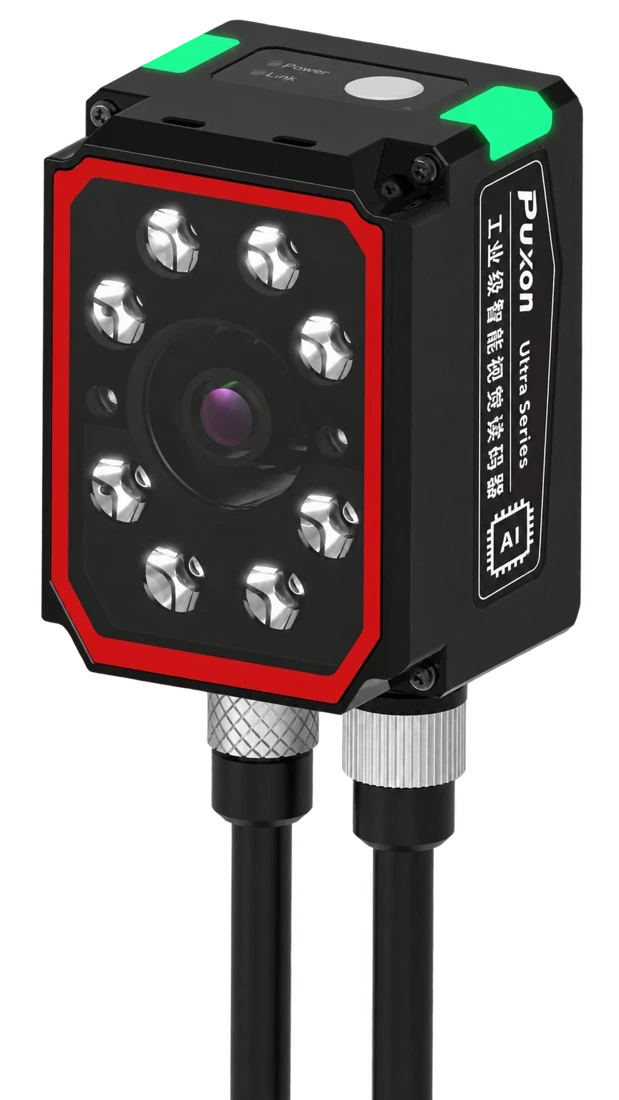
Images are taken from the brochure. Appearance and configuration may vary.
Image acquisition, vision analysis and result output in one camera, with eight types of vision tools to configure for your task.
AI presence detection, AI defect detection, AI classification, OCR, AI counting, passage counting, position correction and shape matching.
Use Natural Vision Studio to configure image acquisition, reference registration, inspection regions and output logic, with PLC signal integration.
Color and monochrome options combine autofocus with a choice of lenses and illumination for different installation distances and part surfaces.
| Models | PX5-CA (color) / PX5-MA (monochrome) |
|---|---|
| Image sensor | Color CMOS / Monochrome CMOS |
| Maximum acquisition rate | 60 fps |
| Illumination options | Partially polarized / Fully polarized / Direct / Diffuse; partially polarized as standard |
| Light source colors | White / Red; white as standard |
| Lens focal lengths | 8 / 12 / 16 / 25 mm |
| Focus system | Autofocus |
| Communication interface | 100 Mbps Ethernet |
| Communication protocols | TCP/IP, EtherNet/IP, PROFINET, Modbus TCP, MC |
| I/O | 2 polarity-insensitive isolated inputs + 3 isolated outputs |
| Power supply | 24 VDC ±10% |
| Operating temperature / Protection | -20°C to +45°C / IP65 |
Lens, light source and illumination are selectable options. Inspection performance depends on the part, imaging setup and sample configuration. Validate the system with the actual inspection task.
Color imaging; select according to part color and inspection requirements.
Monochrome imaging; select according to part features and imaging requirements.
PX5 · Product overview and technical specifications
PX5 · Installation, configuration and operation
PX5 · Product overview and technical specifications
Contact technical support for Natural Vision Studio software and deployment assistance.
Tell us about your codes, parts and installation requirements.